
An all-in-one post-processing stack for VRChat and Unity!
Build your dream s h a d e r
June is designed with a "build your own shader" system in mind. This means that it is neither a collection of shaders nor a single shader. Instead, you get to choose what effects and code are included in your productions. (^_−)☆

It's used by creators .




These are simply examples of popular uses and being featured does not mean that they have a direct associations with myself or June.
Use just one effect, use ten effects, or stack multiple layers of June itself.
Easy setup with avatars & worlds. No scripts required - just a single cube and material.
Get June reacting to AudioLink with a few clicks.
June can pull depth info from the camera to create unique 3D effects.
Optionally, only show to friends, in VRC photos, or other conditions.
June can generate optimised copies of itself with only the code you need.
What is June?
Spooky lighting in horror games, camera shakes in explosions,
and beautiful depth of field camera apertures. What do these
have in common? Post-processing shading.
In case you didn't know, a shader is a tiny program
that runs on your GPU. These let developers access and modify
the colour of pixels on your screen (among other things) and can
run anywhere from on a VRChat avatar to a Unity game's menu
screen. June is a collection of potential code pieces that can
make up a single shader, with a lil fancy editor on top of it
all to allow you to choose what is compiled and what isn't.
E v e r y t h i n g included.
There are a lot of effects in June. No like, seriously. A lot.
- ❤ Falloff
- ❤ UV Cleaning
- ❤ Stencil
- ❤ Unity Blending
- ❤ Quality
- ❤ Passthrough (Mesh/Particle)
- ❤ Target (Unity/VRChat/Beatsaber)
- ❤ Colourspace (Linear/Gamma)
- ❤ VR Compatibility
- ❤ Pixel-by-Pixel Testing
- ❤ Custom Blending
- ❤ Camera Mode
- ❤ Photography Mode
- ❤ Remastering
- ❤ Friends Only
- ❤ 7 Gaussian Styles
- ❤ 2 Selective Styles
- ❤ Bloom
- ❤ Bokeh / DoF
- ❤ Frosted
- ❤ Pixel Distort
- ❤ 3 Extrusion Styles
- ❤ Smear
- ❤ 5 Radial Styles
- ❤ RGB
- ❤ HSV
- ❤ Negativity
- ❤ Radial
- ❤ Layered
- ❤ Blur
- ❤ Curves
- ❤ Whitepoint
- ❤ Invert
- ❤ Whites and Blacks
- ❤ Selection
- ❤ Remap
- ❤ Colourspace
- ❤ Lighting Adjustment
- ❤ Sharpness
- ❤ Saturation and Vibrance
- ❤ Soft and Heavy Contrast
- ❤ Clarity and Lucidity
- ❤ Brilliance
- ❤ Bleach Bypass
- ❤ LUT
- ❤ Channel Swapper and Mixer
- ❤ Colour and Luminance Posterization
- ❤ Tonemapping
- ❤ Letterboxing
- ❤ Box and Circular
- ❤ Polygon
- ❤ Eye
- ❤ Anime
- ❤ Map
- ❤ Alpenglow
- ❤ Aquamarine
- ❤ Aurora
- ❤ Bonnibel
- ❤ Butterfly
- ❤ Candy
- ❤ Ecstasy
- ❤ Fable
- ❤ Lava Lamp
- ❤ Marceline
- ❤ Smokescreen
- ❤ Turbulence
- ❤ Rainbow River
- ❤ Portal
- ❤ Tea
- ❤ Bezier
- ❤ Blackhole
- ❤ Bubbles
- ❤ Bumpy Glass
- ❤ Exaggeration
- ❤ Liquify
- ❤ Warp
- ❤ Wave
- ❤ Deform
- ❤ Anti-Aliasing
- ❤ Denoise
- ❤ Deblur
- ❤ Heavy Lines
- ❤ Soft Lines
- ❤ Upscale
- ❤ Contrast Sharpening
- ❤ FDR
- ❤ ScreenSpace SoftShading
- ❤ Dolly
- ❤ Cloning
- ❤ Screen Background
- ❤ Depth Viewer
- ❤ Objectify
- ❤ Bad Colour Correction
- ❤ Colourblind
- ❤ Corners
- ❤ Colour Crush
- ❤ Colour Cyclone
- ❤ Colour Wheel
- ❤ CRT
- ❤ Monotone
- ❤ Duotone
- ❤ Tritone
- ❤ Engraving
- ❤ Linocut
- ❤ Light Leak
- ❤ Film
- ❤ Normal Mapper
- ❤ Chrome
- ❤ Rainbow
- ❤ Ramp
- ❤ Gradient
- ❤ Low Ink
- ❤ Low Bitrate
- ❤ Grain
- ❤ Glitter
- ❤ Moire
- ❤ Sepia
- ❤ Solarize
- ❤ Specular
- ❤ Tie Dye
- ❤ Technicolour
- ❤ Thermal
- ❤ Threshold
- ❤ Night Vision
- ❤ Ultra Violet
- ❤ Wall Glow
- ❤ VHS
- ❤ Vignette
- ❤ Dither
- ❤ Fauxlate
- ❤ Lieless
- ❤ Pride
- ❤ Trans
- ❤ Music
- ❤ Polaroid
- ❤ Super Eight
- ❤ Magazine
- ❤ Filmdom
- ❤ Neon
- ❤ Diary
- ❤ Comic
- ❤ Film Stripes
- ❤ Lines
- ❤ Ring Colours
- ❤ Noise Colours
- ❤ Sdf Colours
- ❤ Shapes Colours
- ❤ Shapes Uvs
- ❤ Spiral Colours
- ❤ Spiral Uvs
- ❤ Hearts
- ❤ Simple/Advanced Modes
- ❤ UVs
- ❤ Chromatic
- ❤ Colours
- ❤ Acid
- ❤ Blur
- ❤ Distortion
- ❤ Freeze and RGB Freeze
- ❤ Glitch and Glitch Chromatic
- ❤ Pixel Sort
- ❤ Trail
- ❤ Tranquility
- ❤ Tranceless
- ❤ Data Mosh
- ❤ Frame Rate
- ❤ FensterXD
- ❤ Fading Projections
- ❤ Motear
- ❤ Lake Fill
- ❤ Astral and Astral RGB
- ❤ Apart
- ❤ Colour Diffusion
- ❤ Holepuncher
- ❤ Glowstick
- ❤ Grid and Checkerboard
- ❤ Hallucinogen
- ❤ Lenticular Halo
- ❤ Meta Image
- ❤ Palette
- ❤ Rain Line
- ❤ Rim
- ❤ Scanline
- ❤ Stripes
- ❤ Sunbeams
- ❤ Water Reflection
- ❤ Camouflage
- ❤ Inception
- ❤ Object Recognition
- ❤ Fog
- ❤ Silhouette
- ❤ Prismatic Layers
- ❤ Hexatile
- ❤ Secrets
- ❤ Divider
- ❤ Multiple Algorithms
- ❤ Depth-Based Effects
- ❤ Dual Sobel
- ❤ Still Image
- ❤ Animated Image
- ❤ Collage Modes
- ❤ Compression
- ❤ Crosshatching
- ❤ Crystallize
- ❤ Dots
- ❤ Emboss
- ❤ Impressionism
- ❤ Mosaic
- ❤ Neon Rings
- ❤ Oil
- ❤ Monitor
- ❤ Neon
- ❤ Pop Art
- ❤ Unicode
- ❤ Halftone
- ❤ Halftone Circles
- ❤ Halftone Spirals
- ❤ Halftone RGB
- ❤ Bubbles
- ❤ Confetti
- ❤ Data Stream
- ❤ Lens Flare
- ❤ Hexagonal Shield
- ❤ Lightning
- ❤ Mapping
- ❤ Rain Drops
- ❤ Plexus
- ❤ Shanshuo
- ❤ Star Trail
- ❤ Spotlights
- ❤ Visualizer
- ❤ Warp Drive
- ❤ Slide
- ❤ Spot In and Out
- ❤ Box In and Out
- ❤ Tile Bounce and Wave
- ❤ Shutter
- ❤ Radial Swipe and Repeat
- ❤ Dissolve
- ❤ Jagged Swipe
- ❤ Delayed
- ❤ Hexagonal Tiles and Swipe
- ❤ Modelo In
- ❤ Still Image
- ❤ Animated Image
- ❤ Noise
- ❤ Colours
- ❤ Bender
- ❤ Movement
- ❤ Clamp
- ❤ Coordinates
- ❤ Dither
- ❤ Kaleidoscope
- ❤ Mirror
- ❤ Scroll
- ❤ Shake
- ❤ Slicer
- ❤ Melt
- ❤ Mirror Shatter
- ❤ Ring Rotation
- ❤ Refraction
- ❤ Pixelation
- ❤ Pixel Shifter
- ❤ Scanline
- ❤ Shuffle
- ❤ Skew
- ❤ Spherize
- ❤ Transformation
- ❤ Twisted Corridor
- ❤ Recursion
- ❤ 2D Rotation
- ❤ 3D Rotation
- ❤ 3D Pan
- ❤ SpinTerception
- ❤ Quadrant Zoom
- ❤ Swivel
- ❤ Distear
- ❤ Thanos
- ❤ Atmosphere
- ❤ Glitter
- ❤ Shatterwave
- ❤ 3D Lighting
- ❤ Wireframe
- ❤ Wireframe Shatterwave
- ❤ Normals
- ❤ Tripful
- ❤ Hololens
- ❤ LIDAR
- ❤ Corruption
- ❤ World Wrap
- ❤ Spotlight
- ❤ Tryptamines
- ❤ Screen
- ❤ Centering
- ❤ Fisheye
- ❤ Follow
Your Sleek Materials
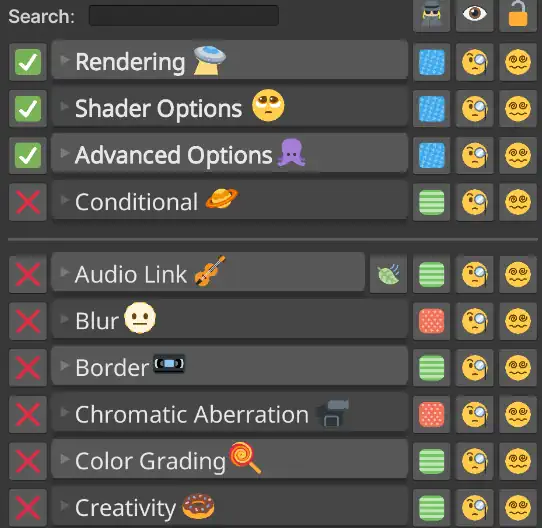
The interface is just as pretty as the effects.
Native To You
English, German, French, Spanish, Korean, Japanese, Chinese, and Russian.
Search Easily
Easily sift through the hundreds of options to find just what you want.
Preset Creator
Play around with default presets or make your own - you can even share them.
Branching Features
Layer June instances, include optional effects, and configure complex setups.
Lock States
Generate optimised shaders for your materials, dropping dead code.
Performance Ratings
Get an idea of how big of a performance hit your materials will be.
Packed with Scripting Power
Streamline your workflow right inside of Unity.
Lyric Maker
Overlayable
Easily make spritesheets of lyrics to overlay.
GIF Converter
Animated
Turn any GIF into a June-ready spritesheet.
Sync June to Music
Baked or Realtime
Surfknasen's animation generator lets you easily sync effects to music. AudioLink is also supported for real-time syncing via material and script.
Unity Management
Easy Integration
Falloff displaying gizmos, colourspace management, setup debugging, and prefab spawning are all one click away.
Render Textures
Game Performant
Games can skip the grabpass performance hit.
UI Config
Customisable
Themes, text colours, layouts, and more.
Community Showcase
See what June is being used for.
Common Questions
If you need any help or have any questions, reach out to me directly~
June is just a normal Unity shader at the end of the day - you can use it anywhere Unity shaders are supported! VRChat worlds and avatars, Unity games, Beat Saber mods, any game moddable with BepinEx, and more.
All of the scripts packed with June are simply helpful tools to use in the Editor, and none are required for June to function. Besides the .shader, June has no dependencies!
June is designed to work well in both Desktop and PCVR. As of writing this, VRChat does not support custom shaders on Quest Standalone, so June will not show up there.
June requires nothing more than a few clicks to use! :)
Inside, you'll find it is all packaged beneath one big user interface that lives on your material (like any other shader in Unity). From there, you just pick and choose in the interface what effects you want to use, tweak their settings, and you're good to go! Everything, from locking in optimised shaders to searching for effects, is made to be as accessible as possible. You never have to leave the material inspector to set up effects.
I designed it to be easy to use because, well, I wanted to use it myself and would struggle if it was difficult :')
June is performant! Or, er, as performant as it can be. Naturally, using shaders and post-processing will always have SOME overhead - running code isn't free, after all. But.. there are a lot of considerations and technical deets to go over in regards to performance, so I'll give a quick summary as to why June is performant by design!
From the ground up, June was built to be modular. Every module is bound to a keyword that your materials store and tell Unity what internal version of the shader to use - that way, it only compiles code you need. That's why you might see a short stutter when enabling new combinations of modules (it's building that shader variant)! This slight annoyance in the editor is worth it big-time for runtime performance.
Beyond that, June has a custom pre-processor that analyses your material and generates a new, single .shader file with only the code you need. It's basically a more permanent version of the keyword system (but you can always unlock!), so you don't have to ever deal with Unity stuttering over compiling variants once you're sure of what you need. It drops a lot more dead code, too, so it's like.. super helpful.
Finally, June is just built to be performant. It culls itself to users who are too far away, uses quicker math where possible (such as avoiding expensive methods pow()), only uses one grabpass for all your effects (unless you need past frames in the Motion module), is contained to one material on one cube, and does it's best to avoid a lot of loops and pre-calculates things (such as blur weights) beforehand to save on run-time performance.
All in all, you can never avoid the cost of running shaders, but June is built to be as efficient as possible with the resources it has! And it helps to have full transparency about what settings impact performance the most, which June has with its performance rating system (just click the icon next to an effect to get a score out of 100 on how intense it is)! Sorry, this was long. But I hope it helps someone. Maybe. :)
June is a one-time purchase - you don't need to subscribe to a Patreon to get updates for what you already paid for. (^.~)
When you buy June, you get an authentication code that works across an unlimited number of projects, computers, whatever. No data about you or your devices is sent/stored - the authentication code simply "watermarks" the code in your copy of June in case it is used to pirate.
Tl;dr: Buy once, use forever, no restrictions (within the terms). Just don't pirate it please. ;_;
Yes! Please reach out to me through any of my provided contacts (Discord and Email are probably the ones I reply to the fastest) and let me know what you are using it for and what your use case is!
Well.. that's a hard one to answer... (×﹏×)
In all reality, June is a HUGE project - and it will continue to be until I stop working on it (hopefully never.. but.. well, no promises). It's packed with tonnes of effects, tools, a custom UI, a pre-processor, and a lot more, in addition to being optimised for VRChat and battle-tested. It takes serious work and at the end of the day, it's just me making it. I also HATE subscriptions and I am sure a lot of you do too! I never want to have to resort to re-releasing June or a Patreon model for updates, and I want it to always be a one-time purchase, so that is also factored into the cost. Pricing June this way allows me to continue developing it with all my heart's love and I am so happy with how far it has come already!
I do understand the difficulties of being in a difficult financial situation on a personal level, and I never want money to gatekeep creativity. If you are struggling to afford June, please reach out to me and maybe we can work something out? There is, also, June Lite - the free sister shader of June.
Overall, I try my best to be fair and June has remained the same price since its initial release despite the massive growth in content and popularity. I hope to always keep it this way and I hope you see this as fair too. ╰(*´︶`*)╯♡
Make Your Workflow Pretty
It's free to try out. But... I do suggest the full version. ☆(>ᴗ•)
June Lite
Perfect for trying and learning.
- 20(ish) Basic Effects
- Minimal UI (No Tools)
- Open Source and Redistributable
June Shader
Ready to make your projects sparkle.
- All 200+ Effects
- Full Suite of Tools
- All Features Showcased (Locking, Etc.)
- Creator & Support Discord
Prices are subject to change and should not be relied on as final. Please refer to the marketplace's page listing for the most accurate price. Currency conversions are estimates only.